博文

目前显示的是标签为“print head”的博文

INKJET PRINTER PRINT HEAD ANTI-BLOCKING TIPS

图片
In the proccess of using inkjet printer , the print head may occur blockage phenomenon. Today I'm going to share some tips to prevent blockage of print head. 1.After the inkjet printer is installed, and the maintenance of the print head is performed at the beginning of the equipment startup 1)In order to get the print head into the best working condition, before the equipment officially begins to undertake the production business, please be sure to print some pictures as much as possible in 1~2 days. The picture is best used in CMYK4 color, and in the picture 2 C, M, Y, and K color bars are added to ensure that all four print heads are always in the inkjet state. 2)It is best to remove the moisturizing sponge in the rightmost cleaning station together with its bracket when printing. 2.How to maintain the print head after the daily work is completed. After all the printing operations are completed every day, in order to keep the print head in the best working co...
Do You Know How to Make a Malfunction Investigation of Inkjet Printer?

图片
1. Inkjet printer print blank fault check The first thing to check the allowance is that the surplus is enough to cause the printing blank. Most of the failures are due to nozzle blockage, ink cartridges and so on. 2.Troubleshooting of inkjet printer output blackening 1) Troubleshoot: There may be two reasons: ink cartridge, printer not used for a long time or direct sunlight, resulting in nozzle blockage. 2) Solution: You can change the cartridge or inject ink. If the cartridge is not used up, it can be concluded that the nozzle is blocked: remove the cartridge (for cartridge nozzles). The integral printer needs to remove the nozzle. Soak the nozzle in warm water for a while. Be careful not to immerse the circuit board in the water, otherwise it will be used. The result is unthinkable. The operation is recommended under the guidance of factory engineers. 3. New ink cartridges do not print out of water after loading, showing the ink 1) Do not remove the labe...

The Cause of Nozzle Disconnection,How to Judge and Deal With It

图片
In the process of digital printing,we may meet this situation- Print head nozzle disconnection. Do you know the cause of print head nozzle disconnection and how to deal with this problem?Today,we will analyze it for you. The cause of print head nozzle disconnection 1. Physical damage due to collisions, paper jams, folds, etc. This situation can only replace the new nozzle. 2. Because the machine is idle for a long period of time, the nozzle's residual ink causes the nozzle to clog. In this case, the nozzle needs to be soaked with cleaning liquid, requiring professional maintenance personnel to operate it. 3. Environmental factors. The working environment requires suitable temperature and humidity, temperature between 18-25 degrees, and humidity around 50. If the temperature is too low or the humidity is too low, the nozzle will be short-term. The specific reason is not explained in detail. 4. Continuous printing, large area and large background color printing...

What Problems Should Pay Attention to When Using the Print Head for A Long Time?

图片
I once read a sentence and deeply agree that "Any product in the world is irreplaceable".Of course, print head is the irreplaceable small product. The user's operating method and basic maintenance in use  are also important factors that affect the long-term use of printer's print head. "illegal" operation We should try to avoid the following situations: 1. Bad habits in daily work. 2 . A sudden power failure during printing caused the print head not to return to normal position. 3 . One-sided pursuit of speed during the printing process pulls paper. 4 . Open the front cover during printing and do harm to the print head, such as pulling paper, wiping parts, etc. 5 . Try to change the position of the parts when the power is on. For example, forcibly pull the carriage from the maintenance cartridge. 6 . For convenience, move the device while the printer is working. Empty print head In daily work, due to long hours, a lot of work, o...

How to Maintain the Inkjet Printers Properly

图片
Inkjet printer has good printing quality, high color reduction and obvious price advantage, so it has a large market share.But if not carefully maintained it,it will not only affect the normal use, but also reduce the life of the inkjet printer. 1. Make sure that the printer works on a solid level and do not put anything on top of the printer.The printer must close its front cover to prevent dust or other hard items from entering the printer's car and causing unnecessary failure. If you open two cartridges at the same time (a black cartridge, a color cartridge), you should put one of the cartridges in the random cartridge case. It is forbidden to plug and draw printed wires on the live line. This will damage the printer's print port and PC's parallel port, and will even break the PC motherboard. 2. Ensure the cleaning of the use of the environment. The use of too much dust in the environment can easily lead to poor lubrication of the guide axis of the word ca...

Canon PF-03 Print Head, Is It Suitable for Your Printer?

图片
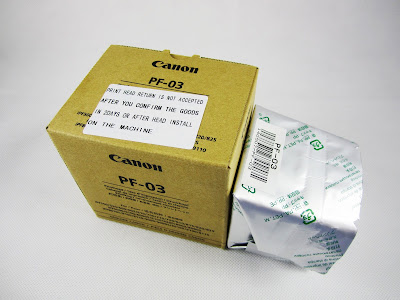
Canon PF-03 printhead , utilising Canon's FINE (Full Photolithograph Inkjet Nozzle Engineering) technology, is designed to produce be-directional printing at incredible speeds without sacrificing image quality. The PF-03 printhead is built with an innovative nozzle manufacturing method which results in precisely uniform ink droplets measured at just 4pl (picolitres). This uniform droplet size ensures that the Canon PF-03 printhead delivers outstanding photo-quality images and pin-sharp drawings. Specifications: 1.  Color: 5 Colors 2.  Nozzle Quantity: MBK*5120 , PBK/C/M/Y*2560 3.  Ink Type: Water based ink ( Pigment, Dye... ) 4.  Smallest Ink Drop: 2.5-4 PL 5.  Highest Precision: 1200*2400 dpi 6.  Work Voltage: 24V 7.  Cleaning: Water based cleaning fluid Suitable printer models: IPF500,IPF510,IPF600,IPF610,IPF700,IPF710,IPF605, IPF810,IPF815,IPF820,IPF825, IPF5000,IPF5100,IPF6100,IPF8000,IPF8100,IPF...

How to Clean Your Epson Print Head?

图片
   As the most expensive part of the inkjet printer , the print head plays an important role in sublimation printing. As we all know, the print head should keep clean, or the color of the image you print will be poor, and the same time, tha print head will easy to be damaged. But, inappropriate cleaning methods will be more harmful for your print head. Many of our customers are using the Epson printer, so we will talk about how to clean the Epson print.    1. Switch on your printer and make sure that there is no print tasks. And please pay attention to the ink light, if it is flashing then you must replace a cartridge before you can continue.    2. Please make sure that there has sublimation paper in the tray.    3. The follow the steps below:   Click “Start”→”Devices and Printers”→double click your epson printer→double click ”Adjust Print Options”→select the “Maintenance” tab→click “Head Cleaning.” These options may vary sli...